
For most homeowners, a targeted set of smart upgrades is worth the investment. A full-panel automation system usually isn’t, unless you’re building new or managing a pool with a heater, spa, multiple lighting zones, and water features that all need coordinated control.
- Who benefits most: Homeowners with heated pools, spas, or vacation properties; busy households that want remote control and scheduling; anyone running a single-speed pump who could cut their energy bill significantly with a variable-speed upgrade.
- Who should skip the full system: Owners of simple, unheated pools who swim seasonally; short-term owners who won’t recoup the installation cost; renters or anyone planning to sell within two to three years.
Targeted component upgrades like smart LED lighting, variable-speed pump scheduling, and a chemistry monitor deliver roughly 80% of practical automation value for a fraction of a full-panel price. A variable-speed pump alone can save a substantial amount on monthly electricity costs compared to a single-speed model, with payback possible within a reasonable timeframe under typical usage. That’s the kind of math that makes automation genuinely worth it, even before you touch a control panel.
Key Takeaways
For most homeowners, targeted component upgrades deliver the best return on automation investment, with a variable-speed pump typically offering the fastest payback of any single upgrade.
| Point | Details |
|---|---|
| Component-first wins | Smart lighting, VS pump scheduling, and a chemistry monitor cover ~80% of automation value for under $2,000. |
| VS pump payback | A variable-speed pump saving $80–$120/month can pay for itself in roughly 12–18 months. |
| Full panels: complex pools only | Full-panel systems cost $3,000–$8,000+ installed and make the most sense for new builds or pools with heaters, spas, and multiple zones. |
| Retrofit requires a real assessment | A professional pre-install check commonly finds incompatible equipment that must be replaced before automation performs correctly. |
| Randrswimmingpools | Central Florida’s local installer since 1985, offering compatibility assessments, equipment upgrades, and full automation installs with written quotes. |
Table of Contents
- How pool automation systems actually work
- The real pros of pool automation for homeowners
- The real cons and drawbacks you should know about
- Costs, typical budgets, and realistic ROI expectations
- Can you retrofit automation to an existing pool?
- Which features to automate first, ranked by homeowner goal
- Maintenance, troubleshooting, and security best practices
- When to hire a local professional and what experience matters
- What automation actually changes day to day
- Randrswimmingpools can handle your automation project from assessment to commissioning
- Sources
How pool automation systems actually work
Pool automation is the industry term for any system that uses a controller, sensors, and actuators to run pool equipment on a schedule or in response to real-time conditions, rather than requiring you to flip switches manually.
The basic architecture has four layers:
- Controller/panel: The brain. It can be a simple digital timer, a standalone smart plug, or a full automation panel (like Pentair EasyTouch or Hayward OmniLogic) that manages every circuit in the equipment pad.
- Relays and actuators: Relays switch equipment on and off; actuators physically move valves to redirect water flow between the pool, spa, water features, or solar panels.
- Sensors: Temperature probes, pH/ORP sensors, and flow sensors feed real-time data back to the controller so it can react automatically (e.g., freeze protection kicks in when temps drop near 34°F).
- Controlled equipment: Variable-speed pumps, heaters, LED lights, salt chlorinators, robotic cleaners, chemical dosers, and automatic covers all connect to the controller through their respective relays or communication protocols.
Two common setups illustrate the range. A basic setup might be nothing more than a digital timer wired to a variable-speed pump, letting you run filtration at low speed overnight and ramp up before guests arrive. A full-panel setup adds pH/ORP sensors that trigger a chemical doser, valve actuators that switch between pool and spa modes, and a smartphone app that lets you preheat the spa from the car. Both are “pool automation.” The difference is complexity, cost, and how much of your pool’s operation you want to hand off.
Control flows work three ways: scheduled actions (run the pump from 10 PM to 6 AM), sensor-triggered responses (freeze protection activates the pump when a temperature sensor reads below a threshold), and remote or manual overrides through an app or keypad.
Pro Tip: Before buying any controller, map out every piece of equipment on your pad and count the circuits. A panel with four relays won’t run a pump, heater, two lighting zones, and a salt system simultaneously. Undercounting circuits is one of the most common retrofit mistakes.
The real pros of pool automation for homeowners
The advantages of pool automation show up most clearly in three areas: time saved, energy reduced, and water chemistry that stays in range without constant manual testing.
- Remote control and scheduling: You can preheat the spa before you leave work, turn off the lights from the couch, or check that the pump is running from a vacation rental 1,000 miles away. For vacation-home owners especially, this is less a luxury and more a necessity.
- Energy savings with variable-speed pumps: A VS pump running at low speed for filtration and ramping up only for cleaning or spa mode uses dramatically less electricity than a single-speed pump running full tilt all day. Paired with smart scheduling, the energy savings on pump upgrades can reach up to 80% compared to older single-speed models.
- Consistent water chemistry: A chemistry monitor with an ORP/pH sensor tracks water balance continuously and can trigger a chemical doser before your chlorine drops low enough to permit algae. Manual testing catches problems after the fact; a monitor catches them before.
- Longer equipment life: Running a pump at the right speed for each task, rather than always at maximum, reduces wear on seals, impellers, and the motor itself. Heaters that cycle on a schedule rather than running continuously see similar benefits.
- Safety integrations: Freeze protection automatically runs the pump when temperatures approach freezing, preventing cracked pipes. Auto-fill sensors maintain water level. Automatic cover alerts notify you if a cover is left open or fails to close completely.
- Ambience on demand: Smart LED lighting lets you change pool color and brightness from an app. It sounds trivial until you’re hosting a party and realize you can set the mood without walking to the equipment pad.
Pro Tip: If ROI is your primary concern, start with the variable-speed pump and a smart timer. That single upgrade typically delivers the fastest payback of any automation investment, and it works independently of any larger control system.
The real cons and drawbacks you should know about
Pool automation has genuine downsides, and the honest version of the pool automation pros cons conversation requires naming them clearly.
- Upfront cost: A full automation panel runs $3,000–$8,000+ installed, according to cost data from Modern Pool Tools. That’s before any equipment upgrades the installer discovers are necessary. For a simple pool, that number rarely pencils out.
- Retrofit complexity: Older pools often have single-speed pumps, line-voltage lighting, and valve manifolds with no actuators. Automating them means replacing equipment, not just adding a controller. What looks like a $1,500 project can become a $4,000 one once the installer opens the equipment pad.
- Ongoing maintenance: Sensors drift. Firmware needs updating. App integrations break when a manufacturer pushes an update that changes the API. Budget for an annual inspection and occasional sensor replacement, particularly for pH/ORP probes, which typically need recalibration every few months and replacement every one to two years.
- Security and privacy risks: Any Wi-Fi-connected pool controller is a network device. Default passwords, outdated firmware, and shared home networks create real vulnerabilities. A compromised controller could run your pump at full speed continuously or disable freeze protection at the worst possible time.
- Vendor lock-in: Pentair, Hayward, and Jandy each use proprietary communication protocols. If you build your system around one brand’s ecosystem, switching later means replacing hardware, not just software.
- Power outage behavior: Most controllers default to a safe state during an outage, but “safe” varies by brand and configuration. Some equipment stays off; some reverts to a preset schedule. If your pool is in freeze-risk territory, know exactly what your system does when the power goes out.
- Automatic pool covers: These deserve a specific note. They reduce evaporation, improve safety, and can lower heating costs, but they’re expensive (often $10,000–$15,000 installed for an automatic version), add mechanical failure points, and require their own maintenance. If evaporation and safety aren’t real problems for your property, the ROI on an automatic cover is hard to justify.
The single biggest practical downside of full-panel automation isn’t the cost itself — it’s paying for complexity you don’t use. A homeowner with a basic rectangular pool, no spa, and no water features who installs a $6,000 panel is buying a system designed to coordinate eight circuits when they only need two. The automation system benefits scale with pool complexity; for simple pools, they often don’t.
Costs, typical budgets, and realistic ROI expectations
The cost range for pool automation is wide because “automation” covers everything from a $30 mechanical timer to a $10,000+ integrated control system. Here’s where the money actually goes:
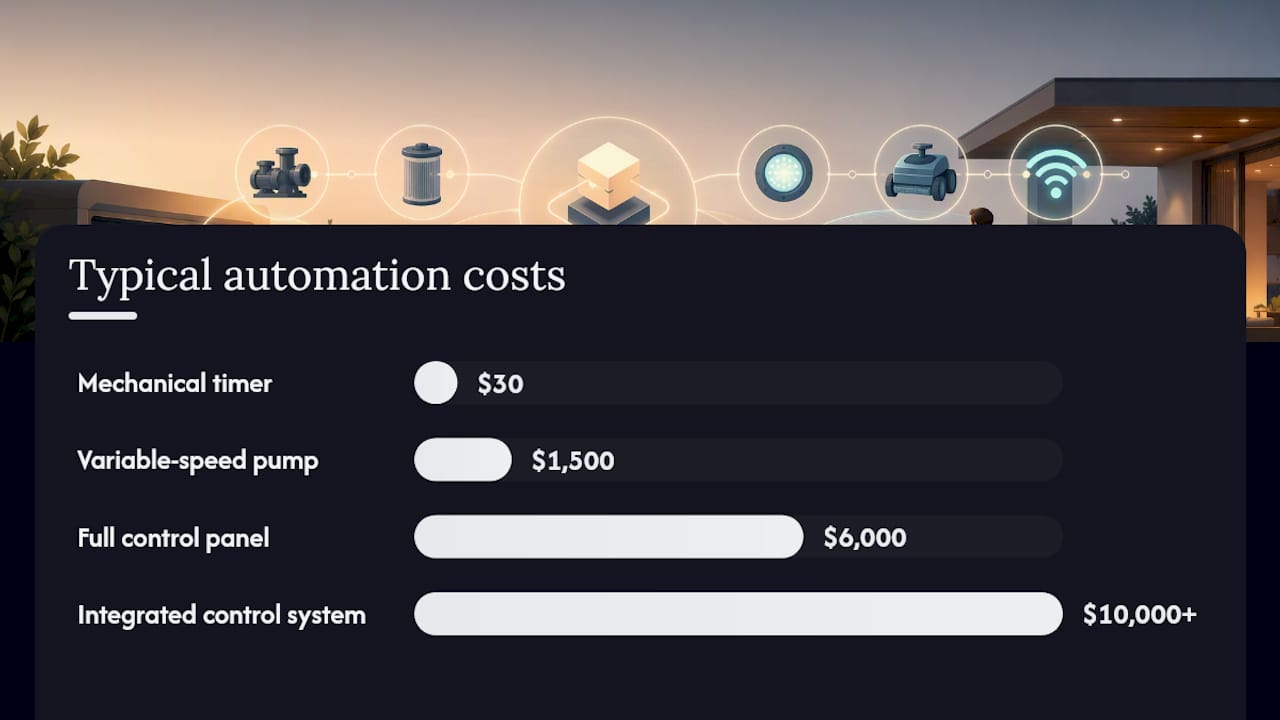
The major cost drivers are pump type (replacing a single-speed pump adds $800–$2,000 to any automation project), the number of relays and valve actuators needed, wiring complexity on older pools, and whether the existing equipment pad has physical space for a new panel.
Payback math, briefly: A variable-speed pump saving $100/month pays for a $1,500 pump in roughly 15 months. Smart LED lighting saves on bulb replacement and energy, with payback typically in two to four years depending on usage. A full $6,000 panel saving $150/month in energy and service costs takes over three years to break even, and that’s an optimistic scenario. For energy-efficient pool options, the pump upgrade is almost always the highest-return first step.
Before you request installer quotes, collect this information:
- Current pump type (single-speed, dual-speed, or variable-speed) and model number
- Heater model and whether it has a communication port for automation
- Lighting type (low-voltage LED vs. line-voltage incandescent)
- Number and location of valves, and whether any have existing actuators
- Wi-Fi signal strength at the equipment pad
- Age and condition of the existing electrical panel and conduit
- Warranty terms and firmware update policy for any proposed equipment
That list prevents the most common retrofit surprise: discovering mid-project that your heater or pump isn’t compatible with the proposed controller.
Can you retrofit automation to an existing pool?
Most existing pools can be partially automated without a full remodel. Whether the project is straightforward or complex depends almost entirely on what’s already installed.
Straightforward retrofits:
- Replacing incandescent or halogen fixtures with smart LED lights
- Adding a smart plug or digital timer to an existing variable-speed pump
- Installing a standalone chemistry monitor that reports to an app without connecting to a control panel
- Adding a robotic cleaner on a timer (no wiring required)
Complex retrofits:
- Replacing a single-speed pump with a variable-speed model (requires new wiring and potentially a new breaker)
- Adding valve actuators to an existing manifold with no actuator mounts
- Installing a full control panel on a pool with undocumented or non-standard wiring
- Integrating older heaters or salt systems that lack a communication port
A professional pre-install assessment commonly reveals compatibility issues or equipment that needs replacement before automation can perform correctly. That’s not a sales tactic — it’s the reality of working with equipment that may be 10–20 years old.
Compatibility checklist to run before any installer visit:
- Pump type and whether it supports variable-speed operation
- Heater model and communication protocol (RS-485, Pentair, Hayward, etc.)
- Existing relay or timer setup
- Lighting voltage (12V low-voltage vs. 120V line-voltage)
- Salt chlorinator model and whether it accepts external control signals
- Valve layout and whether actuator mounts are present
- Available space in the equipment pad for a new panel
- Distance from equipment pad to router (for Wi-Fi signal assessment)
When retrofit complexity is high — old single-speed pump, non-standard wiring, no actuator mounts, and a heater without a communication port — the cost of upgrading everything to make automation work can approach or exceed the cost of building a new equipment pad from scratch. In those cases, folding automation into a broader pool renovation often makes more financial sense than a piecemeal retrofit.
Pro Tip: Ask the installer to provide a wiring diagram and a list of every piece of equipment they plan to replace or add before signing anything. That document is your protection against scope creep and your reference for future service calls.
Which features to automate first, ranked by homeowner goal
Not all automation upgrades are equal. The right starting point depends on what you actually want from your pool.
- Variable-speed pump scheduling (energy savings priority): This is the highest-ROI upgrade for almost every pool with a single-speed pump. The savings are real, the payback is fast, and the upgrade works independently of any larger system. Start here.
- Smart LED lighting (daily convenience and ambience): Low installation complexity, immediate visual payoff, and meaningful energy savings over incandescent fixtures. A good second step for homeowners who use the pool regularly in the evenings.
- Water chemistry monitor with optional doser (maintenance reduction): A pH/ORP monitor that alerts you to chemistry drift prevents algae and equipment damage. Add an automatic doser if you want to eliminate manual chemical additions entirely. Particularly valuable for vacation-home owners who can’t check the pool daily.
- Smart heater control (heating convenience): Scheduling the heater to warm the pool or spa before you arrive, rather than running it continuously, cuts heating costs and extends heater life. Most modern heaters accept a simple thermostat integration without a full panel.
- Robotic cleaner scheduling: A robotic cleaner on a timer handles the most time-consuming manual task. It doesn’t require integration with a control panel, which keeps the cost low.
- Automatic cover (safety and evaporation control): Most valuable for pools in direct sun with high evaporation, properties with young children, or vacation homes where the pool sits unused for weeks at a time. The cost is high and the mechanical complexity is real, so this upgrade makes sense only when safety or evaporation is a genuine concern.
Decision tip: Frequent users who heat their pool should prioritize the pump and heater controls first. Part-time or remote owners get more value from a chemistry monitor, automatic doser, and cover, since those protect the pool when no one is watching.
Mixing components from different brands works, but it means managing multiple apps and no unified dashboard. A full ecosystem (Pentair, Hayward, or Jandy) gives you one interface at the cost of vendor lock-in. For most homeowners doing a component-by-component upgrade, the multi-app trade-off is worth the flexibility and lower upfront cost.
Pro Tip: Resist the urge to buy a full control panel “for future expansion” if you only need two or three circuits today. Start with the components that solve your actual problems, then reassess in a year.
Maintenance, troubleshooting, and security best practices
Automation doesn’t eliminate pool maintenance. It shifts it from daily manual tasks to periodic system checks and occasional technical troubleshooting.
Routine maintenance tasks:
- pH/ORP sensor recalibration every 2–3 months; full replacement typically every 12–18 months
- Firmware updates for the controller and any connected devices (check quarterly)
- Seasonal reprogramming when daylight hours or usage patterns change
- Annual inspection by a qualified technician to check wiring, relay contacts, and valve actuator operation
Common failures and first steps:
- Controller offline: check Wi-Fi signal at the equipment pad first, then power cycle the controller
- Sensor drift (chemistry readings seem off): recalibrate against a fresh test kit before assuming the sensor is faulty
- Pump not responding to schedule: verify the relay is receiving signal and that the pump’s manual override isn’t engaged
- Valve stuck: check the actuator motor for debris or mechanical binding before assuming an electrical fault
Ongoing service and repair needs are a realistic part of owning an automated pool. Budget for periodic checks and occasional component replacement, particularly for sensors and valve actuators.
Security best practices:
- Change default passwords on every connected device immediately after installation
- Put pool controllers on a separate IoT network segment, isolated from computers and phones
- Enable two-factor authentication on any cloud account tied to the controller
- Know how to operate every piece of equipment manually, in case the controller fails or the app goes offline
Pro Tip: Before signing an installation contract, ask specifically: What is the firmware update policy? How long will the manufacturer support this controller model? What happens to remote access if the company discontinues the cloud service? Get the answers in writing. A controller that loses cloud support in three years is a liability, not an asset.
When to hire a local professional and what experience matters
Some automation upgrades are genuinely DIY-friendly. A smart plug on a VS pump, a standalone chemistry monitor, or a robotic cleaner require no electrical work and minimal technical knowledge. Most other upgrades don’t fit that description.
Hire a professional when:
- Any work involves the electrical panel, conduit, or new wiring runs
- You’re installing valve actuators or replacing plumbing components
- The project requires a building permit (many Florida counties require permits for electrical work on pool equipment)
- The manufacturer’s warranty requires professional installation
- You’re integrating multiple systems and need a unified control panel configured correctly
What to get in writing from any installer:
- Full scope of work, including every piece of equipment to be replaced or added
- Wiring diagram for the completed system
- Control panel location and access plan
- Wi-Fi signal test results at the equipment pad
- Training session on the controller and app
- Warranty terms for both labor and equipment
- Software and firmware update policy
- Projected energy savings (with the assumptions behind the estimate)
Randrswimmingpools has been building and renovating custom inground pools across Central Florida since 1985. That local history matters for automation projects because Central Florida’s specific conditions — year-round pool use, high UV exposure, and the occasional freeze event — affect equipment selection and scheduling in ways that a national installer unfamiliar with the region might miss. Local contractors also shorten timelines by knowing which equipment is readily available from regional suppliers and which permits the county requires.
A typical automation project timeline runs: site visit and compatibility assessment (1–2 days after scheduling), written quote (3–5 business days), equipment ordering (1–2 weeks depending on supply), installation (1–3 days for most component upgrades, up to a week for full-panel installs), and commissioning/training (half a day). Permitting for electrical work can add 2–4 weeks in some Central Florida counties, so factor that in if your project involves new wiring.
For smart controls specific to Central Florida homes, local experience with the region’s climate and utility rates makes a real difference in how a system gets configured.
What automation actually changes day to day
The honest version of this is less dramatic than the marketing suggests, and more valuable than the skeptics admit.
The upgrades that change daily life most are the ones you stop thinking about. A variable-speed pump running on a schedule means the electricity bill drops without any ongoing effort. A chemistry monitor that texts you when pH drifts means you catch a problem on Tuesday instead of discovering a green pool on Friday. Smart lighting means you’re not walking to the equipment pad at 10 PM to turn off the pool lights.
What automation doesn’t do is eliminate the need to understand your pool. Sensors still need calibration. Schedules still need seasonal adjustment. And a misconfigured system can cause problems faster than a manual one, because it acts on bad data without hesitation.
The component-first approach is the right one for most homeowners. Pick the upgrade that solves your most annoying problem first, live with it for a season, and then decide whether the next step is worth it. A full panel is genuinely useful for complex pools. For a straightforward residential pool, three well-chosen upgrades will handle the heavy lifting.
Randrswimmingpools can handle your automation project from assessment to commissioning
R and R Swimming Pools brings four decades of Central Florida pool experience to every automation project, which means the site visit isn’t a sales call — it’s a real compatibility assessment that tells you exactly what your equipment pad needs before any money changes hands.
The team checks your existing pump, heater, lighting, and valve layout, identifies any equipment that would limit automation performance, and gives you a written quote with projected energy savings based on your actual setup. Whether you’re adding a variable-speed pump and smart timer or planning a full control panel for a new build, Randrswimmingpools covers the full scope: equipment selection, electrical work, permitting, installation, and training on the system.
Ready to find out what your pool actually needs? Schedule a free site visit and get a written quote with no obligation.
Sources
- Smart Pool Automation: What’s Worth It in 2026 – Modern Pool Tools
- Pool Automation Installation Near Me: What to Expect – PoolLogicSD
- Pool Automation Systems — Cost and Whether They’re Worth It – Scott Payne Custom Pools
